Let GroupTrack build the route
By Fred Kix · 29 October 2026 · route planning
You don't need to know the trails to plan a good ride. Tell GroupTrack where you'll park and how long you want to be out, and it builds the routes for you.
Planning a ride used to mean an evening with a paper map, or a lot of tapping on a small screen to string trails together. I wanted something simpler. In GroupTrack, the planner does the stringing. You answer a couple of questions and pick from what it brings back.
What you tell it
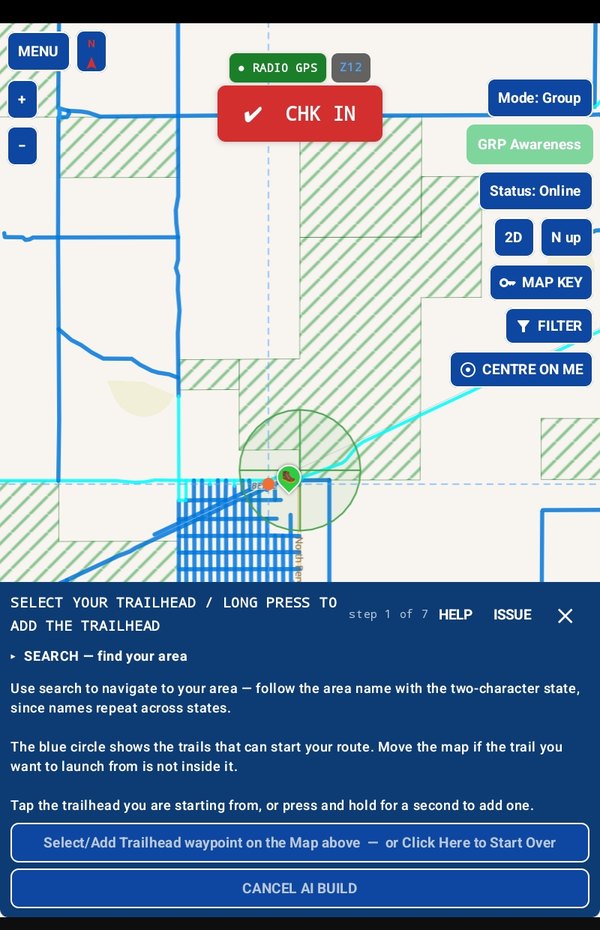
Open Add Route on the bottom of the map and choose AI route design. Then:
- Find the area. Search for the place you want to ride. The map moves there.
- Pick where you'll park. Tap a trailhead that's already on the map, or make one where you'll unload. It just needs a trail within half a mile.
- Say how long a ride you want. Set the distance. The planner works out how long that takes on this kind of ground.
- Finish where you started, or drop a pin where you'd like to end.
That's it. Dropping pins on places you want to see is optional, and I'll cover it in its own article. Leave them out and the planner chooses for you.
What it does with that
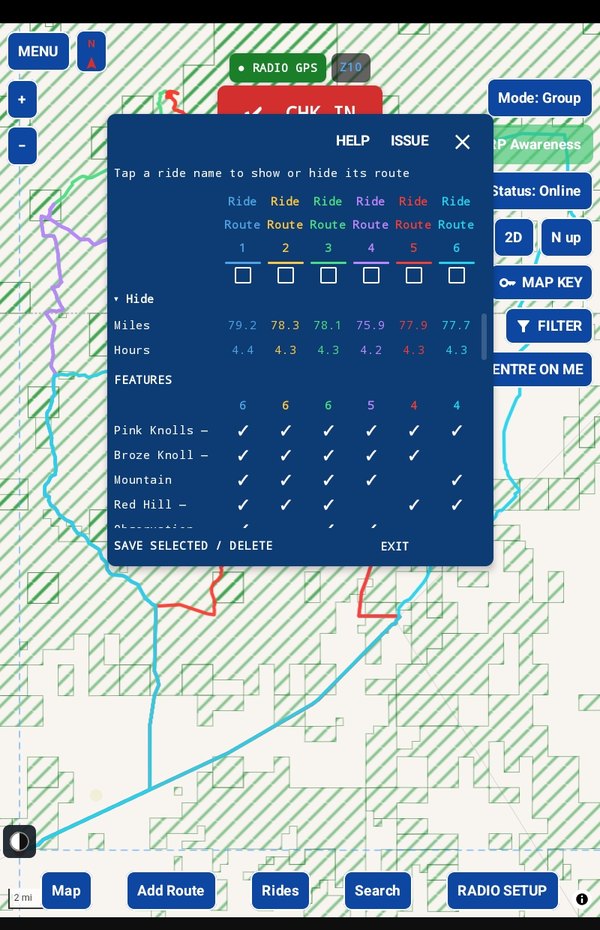
GroupTrack looks at the trails around your trailhead, in every direction, and builds up to six different routes that fit the length you asked for. On new ground that takes about a minute. The trails it uses are the ones on your tablet, so it works with no signal once your trails are loaded.
When it's done, the routes come up together so you can look them over and choose. You keep the ones you like, and they're saved under the name of the area: Beryl 1, Beryl 2, and so on. The ones you don't keep are cleared away.
Want more choices?
GroupTrack keeps your request as a recipe. Build from recipe runs it again in the same area and brings back new routes alongside the one you kept. Handy when the group has ridden the first one already.
Is it hard to use?
No. The first time, a short screen explains what the planner does. Once you've seen it, tick the box and it won't show again. Every screen also has a HELP button that opens the manual at that exact step, so you're never stuck.
In the manual
Take it for a test drive
Download GroupTrack, load your state's trails, and look around the places you ride. Try planning a route.
If it isn't for you, uninstall it. There's no account to close and nothing to cancel.
Help me finish it
Find something missing, awkward or broken? Please reach out to me at support@grouptrack.org. I need your input to finish this.
More articles
Next article: Compare routes before you choose